
Available to active Pro, Pro Plus and Max members on the website and API. Guest, Free, expired and disabled accounts cannot query this tool.
Open IP History and enter a hostname such as api.example.com. The search returns stored A (IPv4) and AAAA (IPv6) records for that exact hostname. It does not include sibling hosts, wildcard matches or IPs reached through CNAME chains.
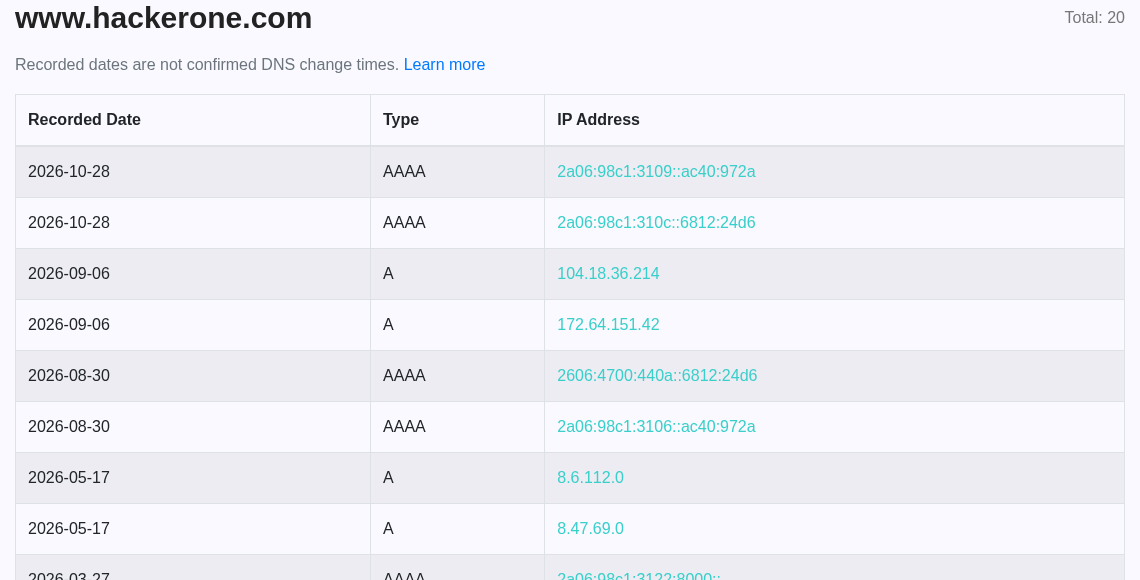
What the dates mean
Results show the date stored with each DNS record, newest first, as YYYY-MM-DD. Collection paths may retain the initial record date or overwrite it on a later import. These dates are not guaranteed first-seen, last-seen or actual DNS change times. An old address is not necessarily inactive, and the newest record is not necessarily the only current address.
Repeated observations of the same hostname and IP may be overwritten or deduplicated. A sequence such as IP A → IP B → IP A cannot be reconstructed reliably from these records. This tool does not start scheduled monitoring, perform live DNS resolution or claim to show additions and removals. An empty result means no matching records were found in the available dataset.
Availability
Successful results may be reused for up to 60 seconds. Search concurrency and retries are bounded to protect the database during busy periods. If the search cluster remains overloaded, this tool returns 503 instead of incomplete or invented results. This is a search availability issue, not a membership restriction.
Limits
Website lookups use the existing daily search allowance and plan result limits. Pages contain up to 100 records, with a maximum window of 10,000 records; lower plan limits still apply. Each page request counts as a lookup. Results can move between pages when imports update records.
API
Pro, Pro Plus and Max members can call GET /api/subdomain-ip-history?hostname=api.example.com&page=1 with their X-API-KEY header. Responses include data.records (ip, type, recorded_date), hostname, page, page_size, available_records, limited, has_next and timestamp_meaning. The available count is capped by the plan; it is not a count of confirmed DNS changes.
Invalid input returns 400, missing or invalid credentials 401, denied access 403, exhausted allowance 429, and an unavailable or incomplete search 503. An incomplete search is never returned as a successful empty result.